How can I display a TV if my device doesn't support password-based authentication?
Last updated: March 3, 2026
Token-Based Authentication
Password-Based Authentication
Requiring an Ambition Username and Password is a layer of security before being able to access the organizational data that's displayed on Ambition TV slides.
Our Device Doesn't Support Password Authentication
If you are using third-party software, digital signage solution, browser, etc that does not support password-based authentication, we can issue you a URL token instead.
Each URL token is associated to an active account in Ambition, and a single token can be used across an unlimited number of TV URLs. Currently tokens cannot be refreshed, but a new token can be issued to another user in Ambition in the event a new token is needed.
Please reach out to gethelp@ambition.com to receive your token.
Use Token-Based Authentication
All tokens must be tied to an active user in Ambition.
These tokens will become inactive once a user is deactivated.
For that reason, it's best to tie tokens to a headless user account that will remain active despite personnel changes, such as "AmbitionTVs@Yourcompany.com."
A single token can be used for multiple TV URLs. However, the token will only work within the same Ambition instance where it was generated.
If you are using token-based authentication, you will need to append the following to your TV URL: ?_tva=YOUR_TOKEN_HERE
If your organization has multiple instances of Ambition, note that each token is specific to one Ambition instance. If your organization uses multiple Ambition subdomains (e.g., company.ambition.com and company2.ambition.com), you will need separate tokens for each instance.
Locate TV URL through Ambition
Users with "TVs: Create" and "TVs: Edit" permission will be able to view the TV tab in Ambition.
Users with "TVs: Create" permission can view and access TV URLs they created. Users with "TVs: Edit" permission can view and access all TV URLs.
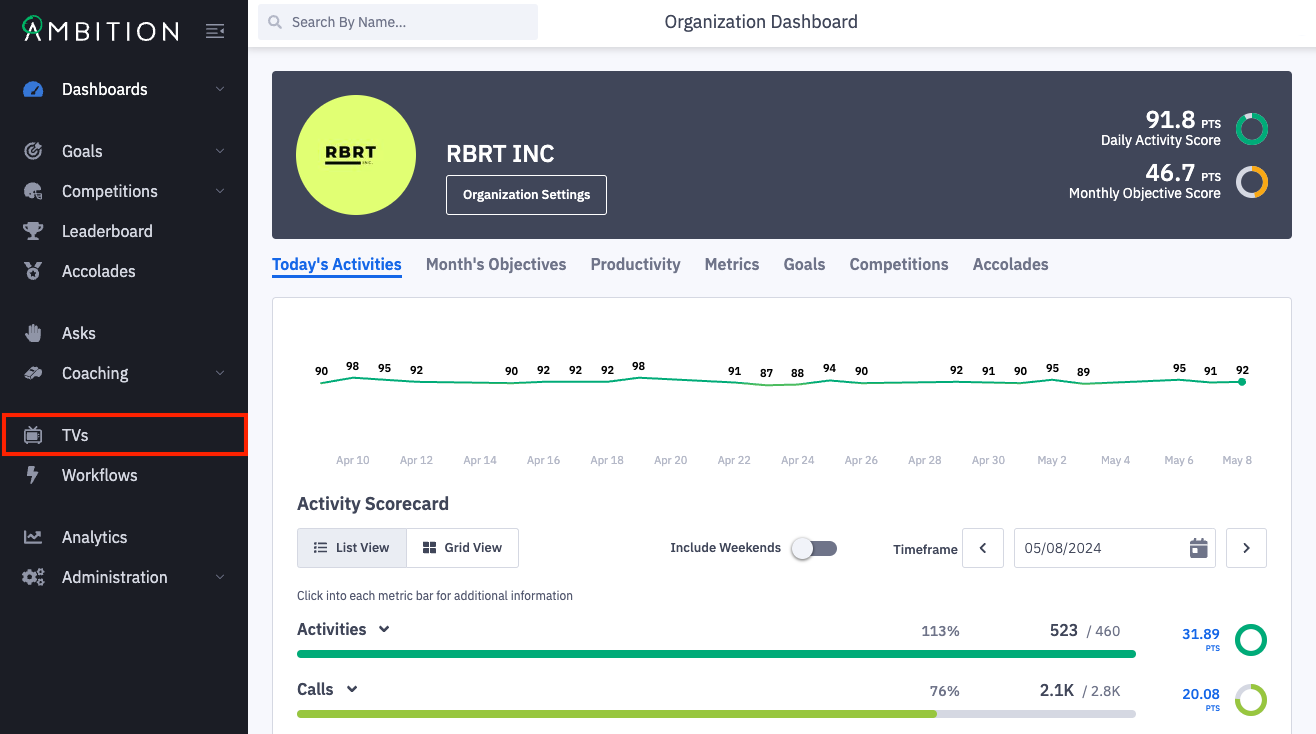
1. Open the left navigation and click TVs.
2. Click on the TV URL that you are needing to display through token-based authentication.
The TV will open in a new tab and you can view the full TV URL.
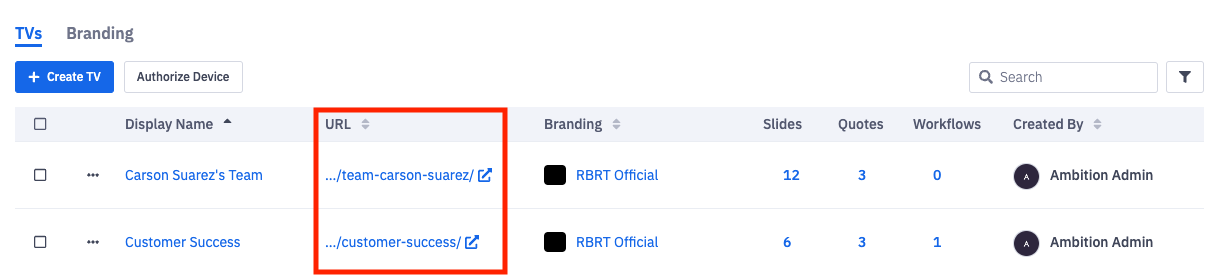
3. Appended the token issued to you by Ambition to the end of the respective TV URL.
?_tva=YOUR_TOKEN_HERE
Example:
URL = https://yourcompanysubdomain.ambition.com/tv/sales/
Token = 123abc
URL + Token =
https://yourcompanysubdomain.ambition.com/tv/sales?_tva=123abc
The link containing Ambition TV URL + Token can now be copy/pasted directly into a browser or digital signage solution which will immediately display an Ambition TV without any username or password.
View TV Content without an Ambition Account
While displaying TVs on third-party software or digital signage systems that don't support password-based authentication is the main reason for using token-based authentication, a token can also be issued if your organization wished to share TV content with users who do not have Ambition accounts.
Use Case:
The CEO wishes to have an Ambition TV running in their office, but the CEO does not have an Ambition account. Token-based authentication would allow for the CEO to access TV content without needing to have an Ambition user license.