How do I grant Salesforce login access to Ambition?
Last updated: June 13, 2025
Salesforce Login Access
Due to the complexity that can come with advanced Salesforce setups, occasionally there will be an issue that's tough and time-intensive to track down.
We strive to resolve all escalated issues through email, phone or screen-share, but sometimes it's easier and more time-efficient for you to grant us temporary access to your Salesforce instance so that we can address and troubleshoot an issue behind the scenes.
Grant Salesforce Account Login Access to Ambition Support
If asked and if you are comfortable granting Ambition permission, you can do so through a built-in and secure system designed specifically for Salesforce-approved vendors.
1. Navigate to Salesforce and click Settings.
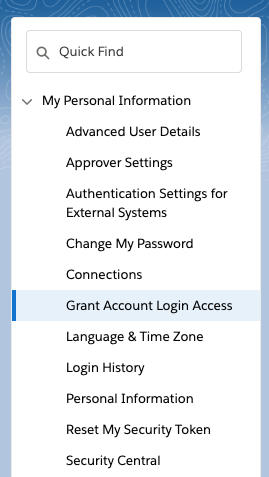
2. Locate your left navigation and click Grant Account Login Access.
3. Select Ambition Support.
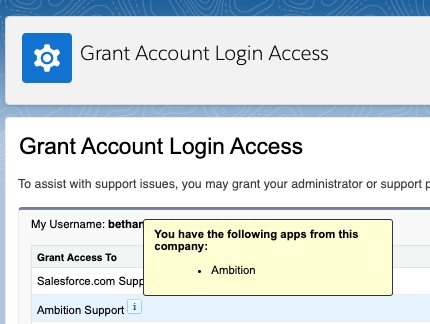
4. Assign a length of time that Ambition can access your Salesforce instance.
Ambition can now temporarily login to your Salesforce Account to diagnose and fix the issue.