How are the different record-based metric types calculated?
Last updated: June 13, 2025
When do I Sum, Average, or Count Metrics?
For records based integrations, Ambition offers three types of metrics: sum, average, and count.
Each type has their own unique use case.
After data has been uploaded to Ambition, the information will be parsed and attributed to the respective employee, as shown in table below.
Record Example
Two Records that have come into Ambition for Katie on 5/1/25
User | Date | Amount_Closed | Record_ID | |
Katie | Katie@yourcompany.com | 5/1/25 | $20,000 | 8320 |
Katie | Katie@yourcompany.com | 5/1/25 | $20,000 | 4381 |
Metric Types
In Ambition you can create three types of metrics from these records: Sum, Average, and Count.
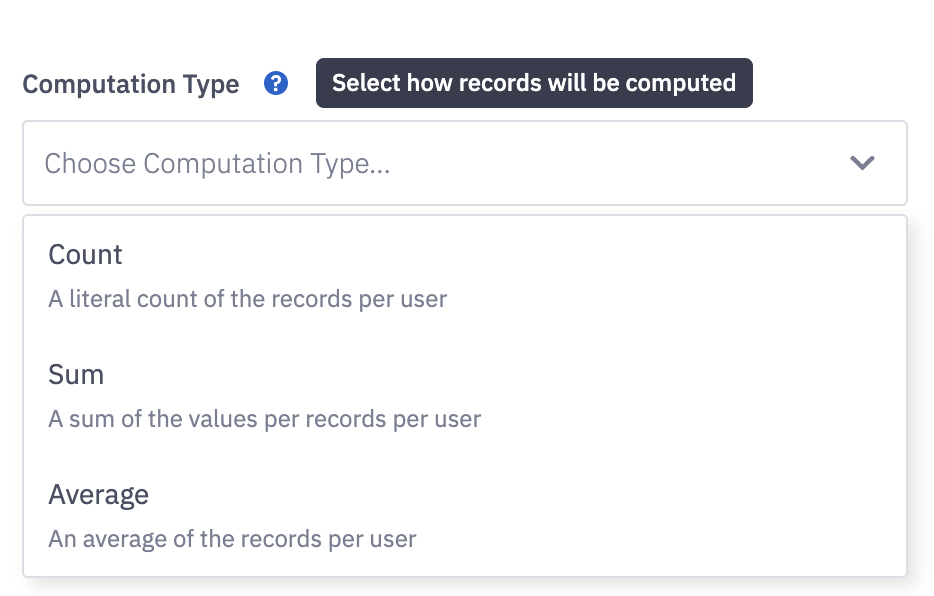
Sum
A sum of the values per records per user.
Example:
"Amount Closed" is a new metric with metric type = sum.
Since the metric type is set to sum the values coming in, Ambition will sum the total records in Katie's name on 5/1/25.
($20,000 + $20,000) = $40,000
Count
A literal count of the records per user.
Example:
"Deal Count" is a new metric with metric type = count.
Since the metric type is set to count the values coming in, Ambition will count the total records in Katie's name on 5/1/25.
(1 + 1) = 2
Average
An average of the records per user.
Example:
"Average Deals Closed" is a new metric with metric type = average.
Since the metric type is set to average the values coming in, Ambition will take the average of the total records in Katie's name on 5/1/25.
($20,000 + $20,000) / 2 = $20,000