What happens when users are added to or removed from a challenge group?
Last updated: January 20, 2026
If a group is actively participating in a challenge, what happens if new users are added to the group?
If the hierarchy level of a challenge is a group of users (role, team, location, etc), users that are moved into competing groups will automatically become participants in existing challenges. Data of new group members will contribute to the group's score based on the group join date.
If the hierarchy level of a challenge is "Employees > within a specific group" or "select employees based on custom filters", you will be given the option to include or exclude new users who are added to a group after the start of the competition.
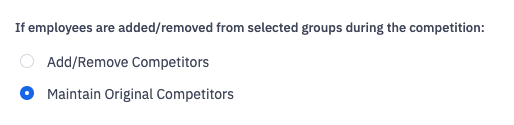
If new group members should be added to the competition and any group members who were removed from the group should be removed from the competition, select "Add/Remove Competitors". If you wish to exclude new group members from being added to the competition or prevent removed group members from being removed from the challenge, select "Maintain Original Competitors".

If a group is actively participating in a challenge, what happens if users are removed from the group or Ambition?
If the hierarchy level of a challenge is a group of users (role, team, location, etc), users that are removed as members of competing groups will automatically be removed as participants in existing challenges. Data of removed group members will still contribute to the group's score based on the date they left the group.
If a user is deactivated from Ambition entirely, any data they contributed to the group's score will be preserved up until the day of deactivation.
If the hierarchy level of a challenge is "Employees > within a specific group" or "select employees based on custom filters", you will be given the option to preserve or remove users who are no longer members of selected groups after the start of the competition.
If competitors who are removed from a selected group should also be removed from the competition, then select "Add/Remove Competitors". If group members who are removed from a selected group should stay in the competition, select "Maintain Original Competitors".
If a user is deactivated from Ambition entirely, any data they contributed toward their score in the challenge will be removed from the challenge and they will no longer be represented as a participant of the challenge.